The device seems offline.
You can try connecting to your device using the new Bluetooth feature in your app and let us know when the app shows connected.
Go to settings and then hardware settings.
Then select Bluetooth, follow the steps to connect.
When asked for location permission, make sure to select "Always or All the time.
If you run into any issues while connecting, please select the diagnostic under Bluetooth and tell us the error.
Call us at 1 888 644 8882 from 8:30 am to 5 pm eastern time Monday to Friday, that way we could try to use that connection to communicate to your device and bring it back online.
Make sure to be in your vehicle, with the engine off, if it was on, turn off the engine, open and close the door so the radio shut off.
Reboot the device by unplugging it for 1 minute and then re-plugging it. (Since it's up to the installer to select where to install it, we don't know the exact location)
If you cannot find your device, you can also disconnect/reconnect the negative pole on the car battery. NOTE : Keep in mind that disconnecting the car battery might reset your clock and could also activate the radio security and an unlock code will be needed.
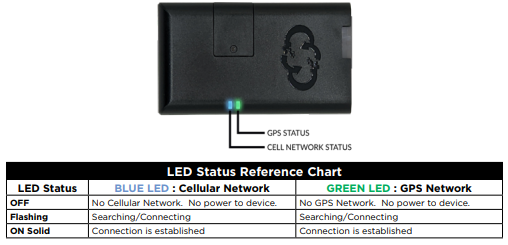
If you need to contact us again, after the disconnect/reconnect, we will need the status of the blue and green led.